

| Supported by LT&I | Limited support may be available |
| Cost | Free |
| Privacy | Privacy Impact Assessment has not been conducted |
| Bandwidth | Low |
| Equipment | Web browser or desktop application |
What is Twine?
Twine describes itself as an “open-source tool for telling interactive, non-linear stories.”
What Can You Use It For?
Branching fiction or non-fiction narratives: Allow students to practice problem-solving in real-world scenarios, explore different outcomes based on what variables or choices they select, or experience interactive text-based or graphic novels.
Text-based games: Although Twine is primarily intended for narratives, many authors have used it creatively to create text-based role-playing games through the incorporation of hyperlinks, images, and GIFs.
Web-based publishing: Twine publishes to HTML, meaning it can be shared publicly or privately on any web hosting service without the need for additional software.
Have students be the creators: Empower students to become designers rather than consumers by allowing them to play, collaborate, and create their own rich, text-based non-linear stories!
How Can You Access It?
Twine is free to use and is available to download as a desktop app or be used in your web browser. Visit twinery.org to get started!

Caution!
Using Twine in your browser will only save your work in your browser – not on a server. It is recommended to download the Twine app so that you story is saved directly on your hard drive. If you choose to use Twine in your browser, be sure to save often and be careful to not delete the save data from your browser!
How Do You Use It?
Getting Started
- Download the Twine app or use in your browser by visiting twinery.org.
- On the Twine dashboard, select “New.”
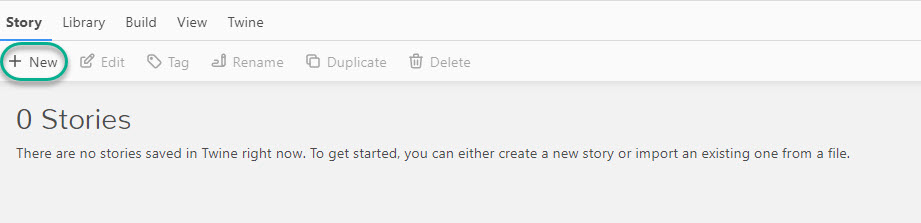
- Give your story a name. This can be changed later.
- You will be presented with a grid pattern and a small box indicating your first passage. Double click to edit.
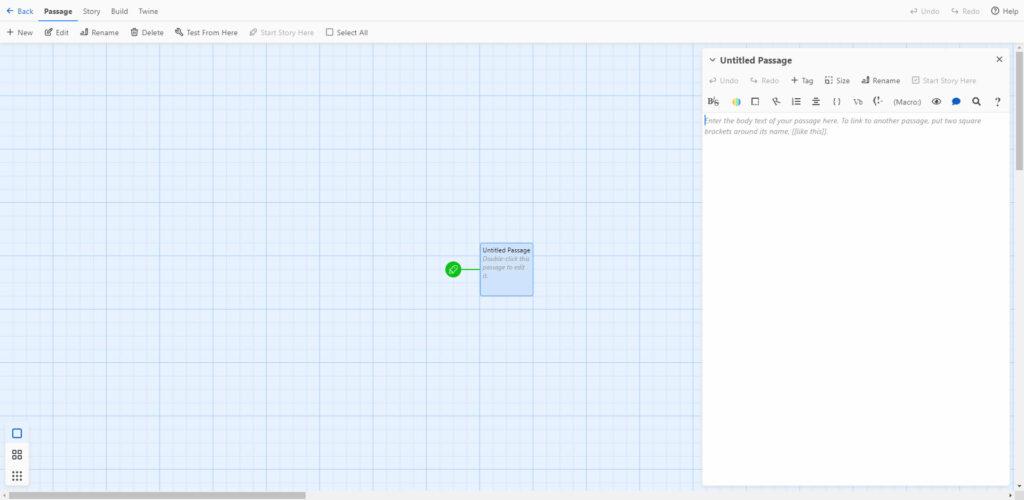
- To create a new, linked passage, add [[name of new passage]] and one will be generated. Here are a few additional formatting tips:
- **Bold**
- //Italics//
- To add an image: <img src = “ImageURL”>

- To test or preview your story, select the “Build” tab and then “Test” or “Play.” When you are ready to publish, select “Publish to File” to create a shareable HTML file.

Additional Resources
Twine is somewhat complex to learn, as there are many additional features to create more complex narratives and games. Although it doesn’t require knowledge of coding or programming knowledge, you can incorporate HTML, CSS, and JavaScript.
- Let’s Play – Twine: Learn how to make your first Twine with this fun and interactive website.
The following resources are provided by Twine to help get you started:
- The Twine Reference Guide: This is the best place to get started for new users. The Reference Guide provides an overview of Twine’s user interface to help you get started in creating, editing, and publishing your stories.
- The Twine Cookbook: The Twine Cookbook includes documentation, tips, and examples of Twine’s features and different story formats.
What Support is Available?
Limited support may be available for Twine. Please feel free to contact us at learningtech@tru.ca if you have any questions!
Visit the Twine Discord channel to connect with other Twine authors, or the Interactive Fiction Community Forum to connect with other interactive fiction authors.